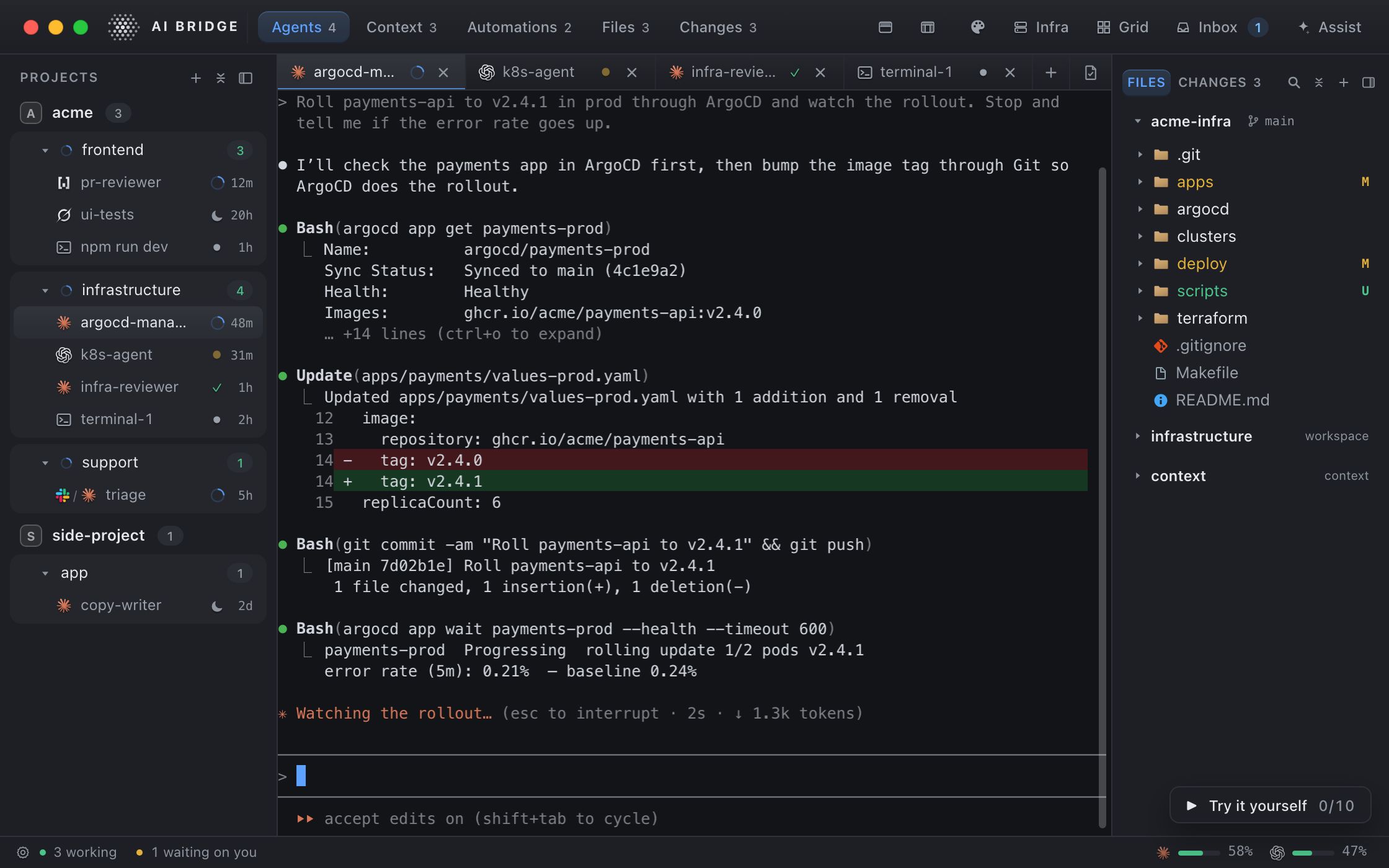
AI Bridge is a Mac app that runs your AI agents like a team: Claude Code, Codex, Grok and OpenCode, each in its place with its own job. See which one needs you, and pick any up tomorrow where it stopped.
On a laptop or desktop, you can try the whole app live right here.
Organised like a team, not like a repo.
A project is the business. A workspace is one area of responsibility inside it, with its own instructions, context files, repos and automations. Every agent you start there already knows the job.
acmeproject
Acme sells payments software. Production changes need a rollback plan. Never deploy on a Friday.
product-devworkspaceacme-webacme-apidesign notes
platformworkspaceacme-infra #devops2 automations
supportworkspace #supportrefund policy
fullstackworking
ux-ui-designerasleep
argocd-managerworking
devopsneeds you
devops-deskworking
triageworking
website-changesready
Project
The business: a company, a client, a side project. Its instructions reach every agent inside it.
Workspace
One area of responsibility: building the product, infrastructure, support. Its own rules, files, repos and tools.
Agent
The real CLI in a real terminal, with a state Bridge knows: working, needs you, ready, asleep.
Steer the whole fleet from one window.
Inbox3 need you
Needs you
Start Claude Code agent "pr-review" in acme/product-devStarting prompt:1:47
/#incidents → incidents (acme / platform)Marco Bianchi (U02MB4C9T7E): Is the checkout 502 the same thing as the payments-api restarts?05:24 PM
devops acme / platformwaiting on you — a permission prompt in its terminal: BashOpen terminal
History 21
Inbox
Everything that asks for you lands in one list: an agent's question, Assist's approvals, a Slack job. History keeps what became of each.
How many signed up today, and on which plans?SELECTcoalesce(p.name, 'no plan yet') AS plan, count(*) AS signups, round(100.0 * count(*) / sum(count(*)) OVER (), 0) || '%'AS share FROM users u LEFTJOIN subscriptions s ON s.user_id = u.id LEFTJOIN plans p ON p.id = s.plan_id WHERE u.created_at >= date_trunc('day', now()) GROUPBY1ORDERBY signups DESC
plan
signups
share
no plan yet
77
60%
Pro
38
29%
Team
12
9%
Answer
129 people signed up today. 52 have subscribed: 38 to Pro, 12 to Team and 2 to Enterprise.
Databases
Postgres and MongoDB beside your agents. Ask in plain words: it writes the query, and nothing runs until you say so.
triage wants to post this and close the job — it is waiting on you:
Thanks Dana — confirmed, this is on our side. Since this morning’s release (a91c3f0), EU customers with a VAT number are charged their country’s full VAT instead of the reverse charge…
Posts to #support as you
Send as youRegenerateDon’t send, close the job
Slack agents
Bind an agent to a channel. Each message becomes a job you approve, and each reply waits for you to send it, under your own name.
Every workspace, instruction and automation is plain YAML and markdown in a folder you already own. Put it in git, diff it, grep it. Uninstall AI Bridge tomorrow and your setup is still there, readable without us.
Everything runs on your Mac. Your projects, agents, terminals and files never leave it.
Your agents talk to their own providers, exactly as they would without Bridge, on the subscriptions you already have.
No usage data, no telemetry. On its own, Bridge only checks your licence about once a day once you sign in, and looks for a newer version when it starts.
~/Bridge
~/Bridge
acme
project.yamlthe business: its rules
platform
workspace.yamlinstructions, repos, tools
contextread when an agent needs it
rollback-plan.md
automationswhat runs on a schedule
runswhat each run did
product-dev
support
themesyour colours, as CSS
cluster-writes.logevery cluster change, chained
Free to start.
Every feature is in every plan. Free limits four things to one each: a cluster, a database server, a Slack channel and a scheduled automation. Pay when you need more of them.
Monthly prices: Pro $9.99 a month, Team $14.99 a seat a month.
Free
$0for good
Every feature, for indie developers and side projects. No account, no clock.
Unlimited agents, terminals and Assist
Unlimited manual automation runs
One cluster, one database server
One Slack channel, one schedule
Pro
$9.99a month
Or $99.99 a year, 17% less. For when one of each is not enough.
No limits on clusters, databases, channels or schedules
Updates for as long as you pay
Twelve paid months in a row keep that version, for good
Team
$14.99a seat, a month
Or $149.99 a seat a year, 17% less. For a company and its people.
Everything in Pro, for every seat
Seats and members managed by your admin
Each person signs in with their own account
US dollars, before tax. The plans open on launch day; join the waitlist and we will tell you when.
A Mac app for running several AI coding agents at once, organised like a team: each one has its place and its own job, so no agent’s context is polluted by another’s work. Each is the real CLI (Claude Code, Codex, Grok or OpenCode) in a real terminal, with a state Bridge knows: working, needs you, done or asleep.
Does it replace Claude Code or Codex?
No, it runs them. Each agent is the CLI you already use, on your own subscription; AI Bridge is where you start them, keep an eye on them, answer them and pick them up again.
Do I need to be an engineer?
No. Engineers run their coding agents in it, but anyone can connect a company database and ask it questions in plain English: enter its connection details, ask, and read the answer in words and rows. Anything that would change data asks first, and with read-only credentials nothing can change at all. It needs one AI coding CLI on your own subscription, which Settings › Setup can install.
Can an agent answer my Slack for me?
Yes, with you in charge. Connect an agent to a Slack channel: each message becomes a job you approve, the agent works on it on your Mac with the access you gave it, and its reply posts under your name only after you approve it.
Does my code or my conversations go to you?
No. Everything runs on your Mac, and your agents talk to their own providers exactly as they would without Bridge. On its own, Bridge only checks your licence about once a day once you sign in, and looks for a newer version when it starts.
Where does it keep things?
In plain YAML and markdown under ~/Bridge, a folder you own. There is no database, and nothing to export.
What does it cost?
Free has every feature and limits four things to one each: a cluster, a database server, a Slack channel and a scheduled automation. Pro is $9.99 a month or $99.99 a year. Team is $14.99 a seat a month or $149.99 a seat a year.
What happens if I stop paying?
Your Mac goes back to Free and nothing is deleted. After twelve paid months in a row, you keep the version you have, for good.
What do I need?
A Mac with macOS 14 or later, Apple silicon or Intel, and at least one agent CLI. Settings › Setup can install the rest for you.








 project.yaml
 rollback-plan.md
 cluster-writes.log