Codex CLI on your Mac, beside Claude Code

AI Bridge runs OpenAI’s Codex CLI as it is, on your own plan, in a real terminal, next to your Claude Code, Grok and OpenCode sessions. One app shows which of them is working, which is waiting on you, and which is done.

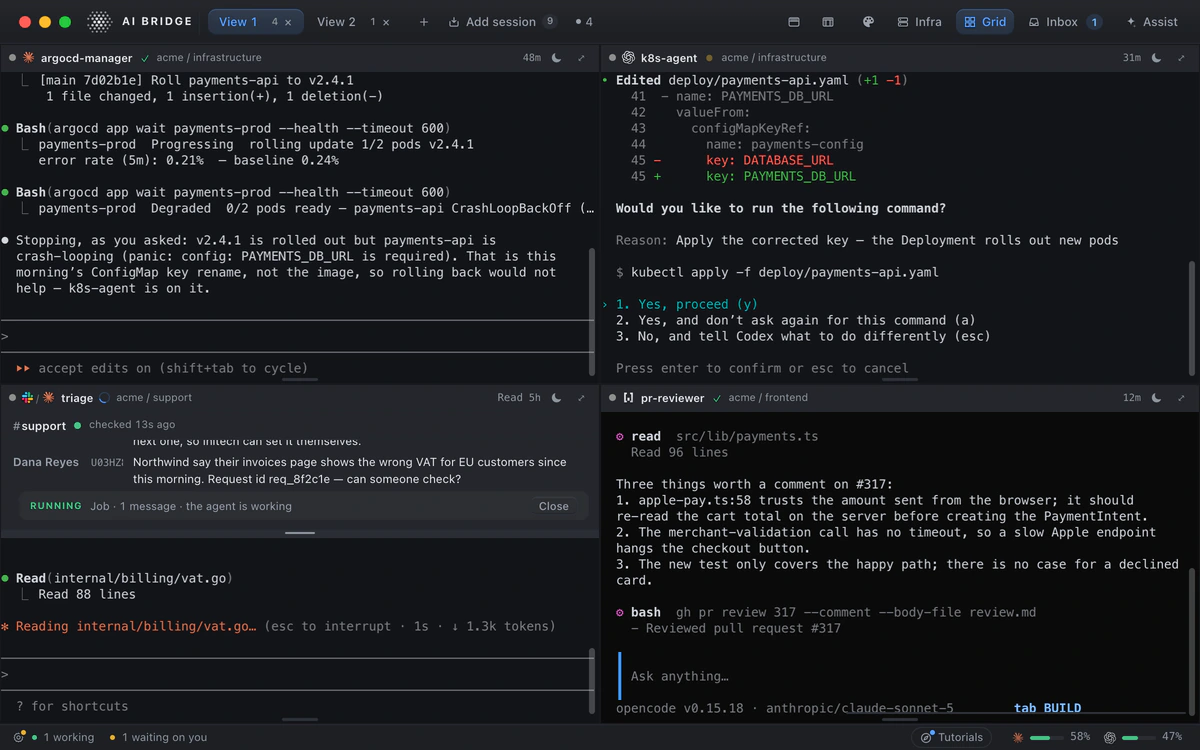
The Grid in AI Bridge: Claude Code, Codex, a Slack agent and OpenCode working side by side, with Codex asking to apply a Kubernetes fix
The Grid: Codex asks before it applies its fix, while Claude Code, a Slack agent and OpenCode work beside it.

The real Codex, on your plan

Every Codex agent in AI Bridge is the codex command you would run yourself, in a real terminal, using your own ChatGPT plan or API key. AI Bridge adds a place for it to live, not a layer between you and OpenAI.

It never edits your ~/.codex configuration: what it needs to know a session’s state is passed on that launch’s command line, so your setup in your own terminal stays exactly as it was.

Know when Codex is waiting on you

Codex stops to ask before it runs a command it is not sure of. In a terminal tab you notice when you happen to look. In AI Bridge the session says it is waiting on you, in the sidebar and in the Inbox, beside everything else that needs you. See how that works across several agents.

Side by side with Claude Code

Give Codex and Claude Code the same problem and watch both on the Grid, a wall of live sessions you arrange yourself. Or give each the work it does best: Codex in one workspace, Claude Code in another, Grok and OpenCode where they fit.

Organised by the job

A Codex session starts in a workspace, an area of responsibility with its own instructions, context files and repos, so it begins knowing the rules of the job rather than nothing. Put it to sleep at the end of the day and wake it tomorrow where it stopped.

Codex in a Slack channel

A Codex agent can be bound to a Slack channel: each message becomes a job you approve before it starts, and each reply waits for you to send it. It can also work beside your clusters and your databases.

Questions

Is this OpenAI’s Codex CLI or a copy of it?

It is the real Codex CLI, the one you install from OpenAI, running in a real terminal. AI Bridge starts it, shows its state and keeps its session; it does not reimplement it.

Which account does Codex use?

Yours: the ChatGPT plan or OpenAI API key Codex already uses in your terminal. AI Bridge has its own plans for its own features, and its Free plan has no limit on agents.

Does it change my Codex configuration?

No. AI Bridge never edits ~/.codex. What it needs to follow a session is passed on that session’s own command line.

Can I run Codex and Claude Code on the same task?

Yes. Start one of each in the same workspace and put them side by side on the Grid. Each works in its own terminal with its own CLI.

Codex or Claude Code: which should I use?

Many people use both, and pick per task. AI Bridge does not make you choose: give each the same problem, watch them side by side, and keep the session that did better. Each runs on your own plan with its own provider.

What do I need?

A Mac with macOS 14 or later, Apple silicon or Intel, and the Codex CLI. Settings › Setup can install it for you.

More of what AI Bridge does

Almost ready.

AI Bridge is in its last round of testing. Leave your email and we’ll send you the build the day it ships.