Your clusters, next to the agents fixing them
Every context in your kubeconfig appears in AI Bridge: workloads, pods, services, config, events, logs. The Claude Code or Codex agent working on an incident sits in the same workspace, so you can watch the deployment it is fixing while it fixes it.
A change names its cluster first
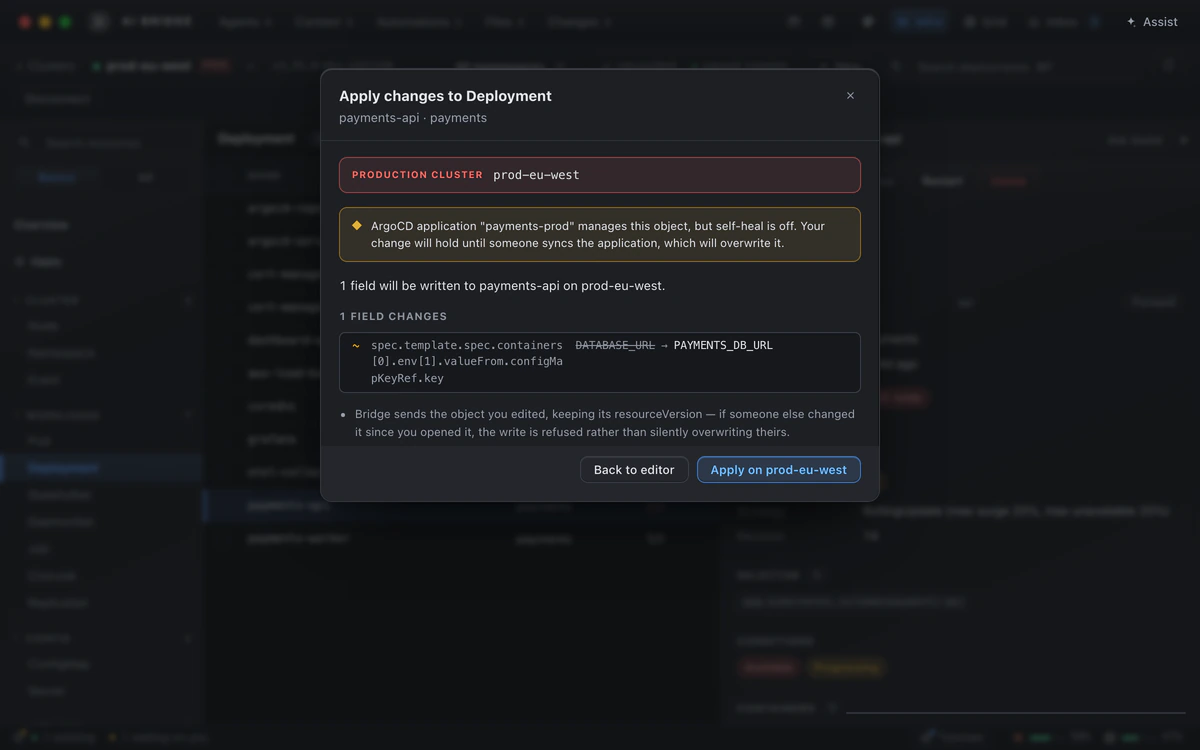
Edit YAML, scale, restart, cordon, drain, trigger a job, delete: every change goes through a card that names the cluster in its title, its sentence and its button, with production clusters marked as such. If ArgoCD, Flux or Helm manages the object, the card warns that your change may be reverted before you make it.
On the record, with a way back
Every write is added to a tamper-evident log on your Mac, which you can verify and export. Before anything destructive, AI Bridge saves the object’s own YAML, so you have what you need to put it back.
Helm, logs and shells
- Helm releases with their values, history and rendered manifests; change values or the chart version after reviewing the diff, and roll back.
- Logs, a shell into a container, and port forwards that stay on your Mac.
- Several objects at once, with one card for the whole selection.
Your context stays yours
AI Bridge never runs kubectl config use-context: it names its cluster on every request instead, so the context your own terminals use never changes under you.
Beside the rest of the job
The same app holds the agents, your databases and the Slack channel where the incident was reported. See how the agents fit together.