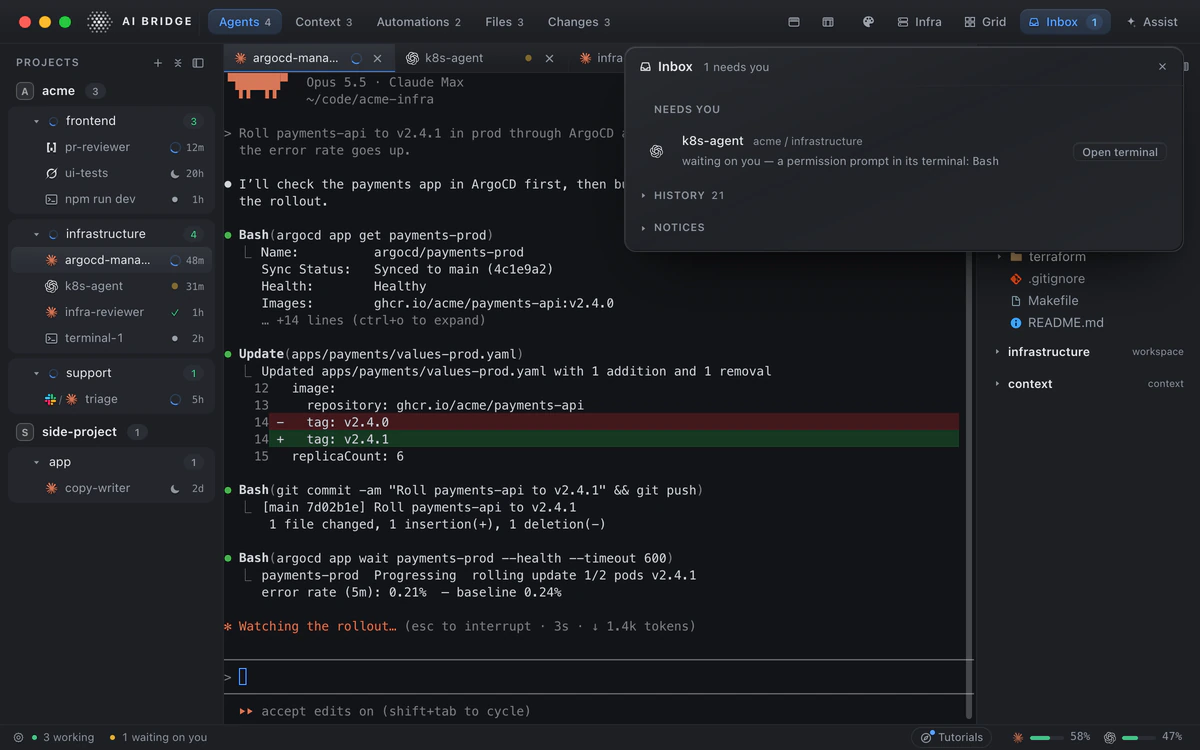
The problem with tabs
A terminal tab knows nothing about the agent in it. It cannot tell you that one agent has been sitting at a permission prompt since lunch, that another finished an hour ago, or which of six tabs is the one rolling out to production. So you check them, one by one, and the checking becomes the job.
1. Give each agent a place
In AI Bridge an agent lives in a workspace: one area of responsibility, such as the product, infrastructure or support, with its own instructions, context files, repos and tools. A project above it holds the rules for the whole business. You find an agent by the job it does, and every new agent starts already knowing that job.
2. One glance says what each is doing
Every agent shows its live state in the sidebar: working, waiting on you, done or asleep. That works the same for Claude Code, Codex, Grok and OpenCode, because AI Bridge follows each CLI itself rather than guessing from its output.
3. One Inbox for everything waiting on you
A permission prompt, a question from a Slack job, an approval Assist is asking for: they all land in the Inbox. Approve a Slack job or an Assist action right there, or jump to the terminal that is asking; its History keeps what became of each. Nothing waits unseen in a tab.
4. Watch the ones that matter on one wall
The Grid puts the sessions you care about today side by side, live, across every project: the deploy, the review, the bug. Make more than one view, and switch between them.
5. Sleep what you are not using
Put an agent to sleep and wake it tomorrow with its conversation resumed. A fleet you can pause and resume stays small enough to steer.
6. Let the app do the starting
Assist is an agent that works the app for you: “start an agent in infrastructure to review the open PR”. Every action it takes shows you a card first, and nothing it can do is irreversible.
Where the agents can work
Beside the agents, AI Bridge holds what they work on: your Kubernetes clusters and your Postgres and MongoDB databases, each change named and recorded.