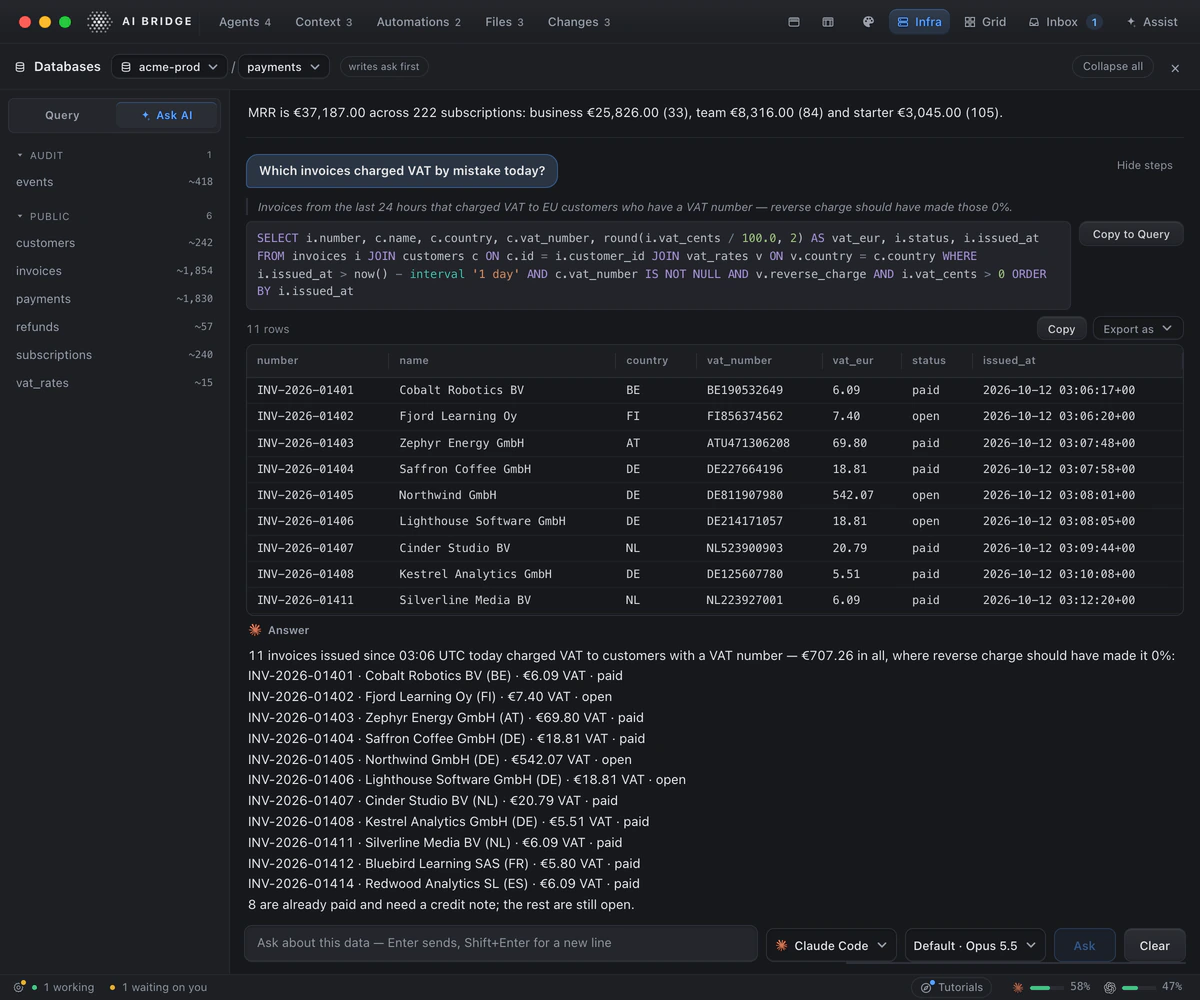
A question, then the query: natural language to SQL
Type what you want to know: “How many people signed up today, and on which plans?” AI Bridge writes the SQL, or the MongoDB query, for the database you are connected to, and shows it to you before it runs. You stay the one who decides what touches your data.
Nothing writes until you say so
Reading is one step. Anything that would change data asks first, with the exact statement in front of you, so a query written in plain English cannot quietly turn into an update.
The answer in words and rows
The result comes back as a table you can read and export, and as a sentence that answers the question you asked, not just the one the query asked.
For people who are not engineers
You do not need to write SQL. A business owner, a project manager or anyone who needs numbers from the company’s database can enter its connection details, ask in plain English and read the answer, without waiting for an engineer to run a query. Reads change nothing, and anything that would change data asks first. For someone who should only look, use read-only credentials: then nothing can change, whatever is clicked.
Your own AI, your own account
Ask AI works through one of the AI coding CLIs you already use, such as Claude Code or Codex, on your own account with that provider. Pick the model in the same picker the rest of the app uses.
Beside your agents
The database sits in the same app as the agents working on the code that uses it, the cluster it runs on, and the channel where someone asked why the numbers look wrong. See how it all fits together.