AI Bridge is a Mac app that runs your AI agents like a team: Claude Code, Codex, Grok and OpenCode, each in its place with its own job. Plus clusters and databases, and agents in your browser and phone.
The command center for building and maintaining software
The filmTry it live
AI BridgeFileEditViewWindowHelpTue 6:42 PM
AI Bridge
On a laptop or desktop, you can try the whole app live right here.
Organised like a team, not like a repo.
A project is the business. A workspace is one area of responsibility inside it, with its own instructions, context files, repos and automations. Every agent you start there already knows the job.
acmeproject
Acme sells payments software. Production changes need a rollback plan. Never deploy on a Friday.
product-devworkspaceacme-webacme-apidesign notes
platformworkspaceacme-infra #devops2 automations
supportworkspace #supportrefund policy
fullstackworking
ux-ui-designerasleep
argocd-managerworking
devopsneeds you
devops-deskworking
triageworking
website-changesready
Project
The business: a company, a client, a side project. Its instructions reach every agent inside it.
Workspace
One area of responsibility: building the product, infrastructure, support. Its own rules, files, repos and tools.
Agent
The real CLI in a real terminal, with a state Bridge knows: working, needs you, ready, asleep.
Steer the whole fleet from one window.
Inbox3 need you
Needs you
Start Codex agent "pr-review" in acme/product-devStarting prompt:1:47
/#incidents → incidents (acme / platform)Marco Bianchi (U02MB4C9T7E): Is the checkout 502 the same thing as the payments-api restarts?05:24 PM
devops acme / platformwaiting on you — a permission prompt in its terminal: BashOpen terminal
History 21
Inbox
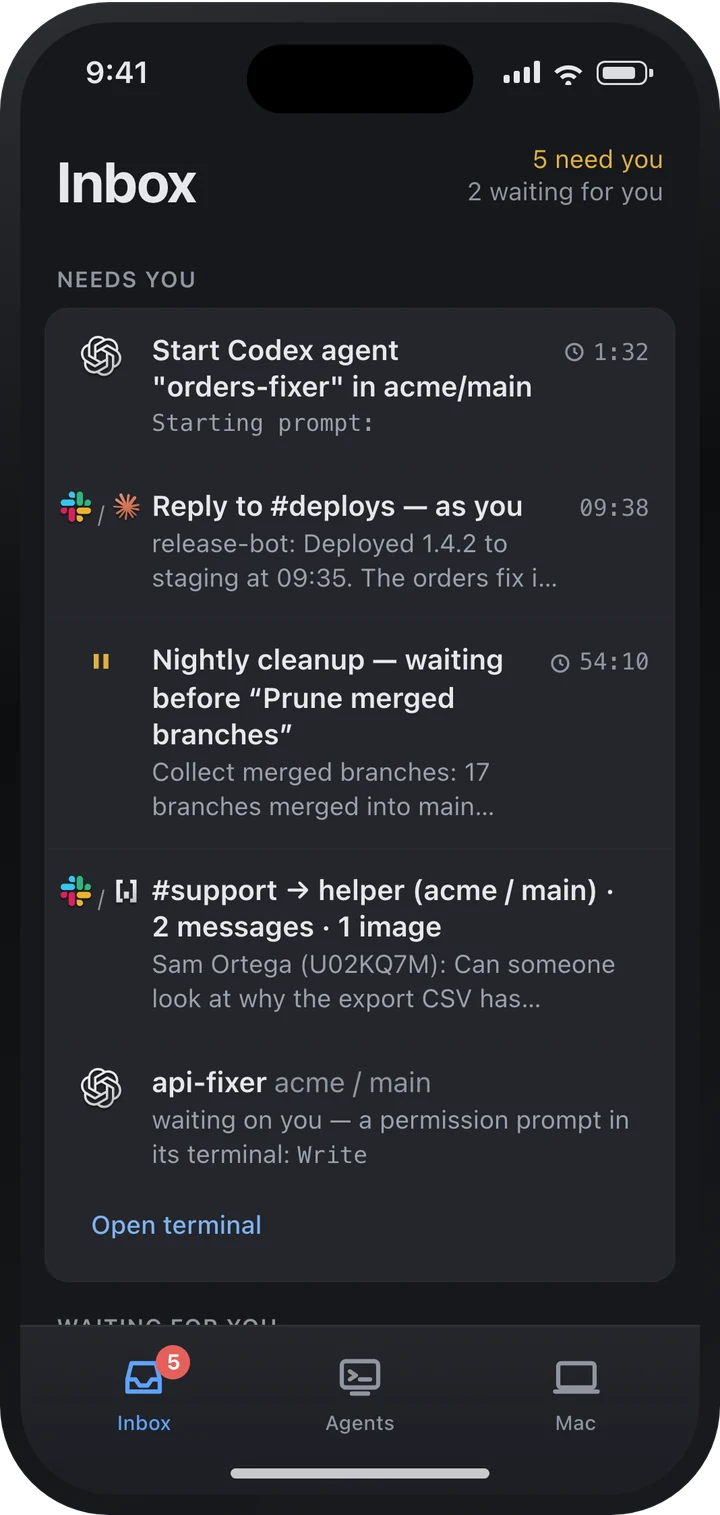
Everything that asks for you lands in one list: an agent's question, Assist's approvals, a Slack job. History keeps what became of each.
The checkout tests need the Stripe test clock reset before each run
ApplyDismiss
Knowledge your agents keep
Plain Markdown topics in your project that every agent reads when it needs them. Dreaming goes over your agents’ sessions and turns the mistakes they keep repeating into lessons; nothing changes until you apply one. Share it with your team, end-to-end encrypted (beta).
How many signed up today, and on which plans?SELECTcoalesce(p.name, 'no plan yet') AS plan, count(*) AS signups, round(100.0 * count(*) / sum(count(*)) OVER (), 0) || '%'AS share FROM users u LEFTJOIN subscriptions s ON s.user_id = u.id LEFTJOIN plans p ON p.id = s.plan_id WHERE u.created_at >= date_trunc('day', now()) GROUPBY1ORDERBY signups DESC
plan
signups
share
no plan yet
77
60%
Pro
38
29%
Team
12
9%
Answer
129 people signed up today. 52 have subscribed: 38 to Pro, 12 to Team and 2 to Enterprise.
Databases
Postgres and MongoDB beside your agents. Ask in plain words: it writes the query, and nothing runs until you say so.
> a view of our open pull requests and who they’re waiting on
Pull requestsacme/product · every 5 min
#317 checkout: add Apple Paywaiting on review
#314 invoices: dark mode2 approvals
#309 upgrade to Next.js 15.5checks failing
Custom views
Say what you want to see: open pull requests, security findings, a cluster, your Mac’s CPU and memory. AI Bridge builds the view with live data, and its buttons ask before they run.
#Reply to #support — as you+1 in Inbox
triage wants to post this and close the job — it is waiting on you:
Thanks Dana — confirmed, this is on our side. Since this morning’s release (a91c3f0), EU customers with a VAT number are charged their country’s full VAT instead of the reverse charge…
Posts to #support as you
Send as youRegenerateDon’t send, close the job
Slack agents
Bind an agent to a channel. Each message becomes a job you approve, and each reply waits for you to send it, under your own name.
A free extension for Chrome and Brave. Share the windows you choose, and your agents can read and work in them, signed in as you, and in nothing else. With Pro, Team or the trial.
iPhone app
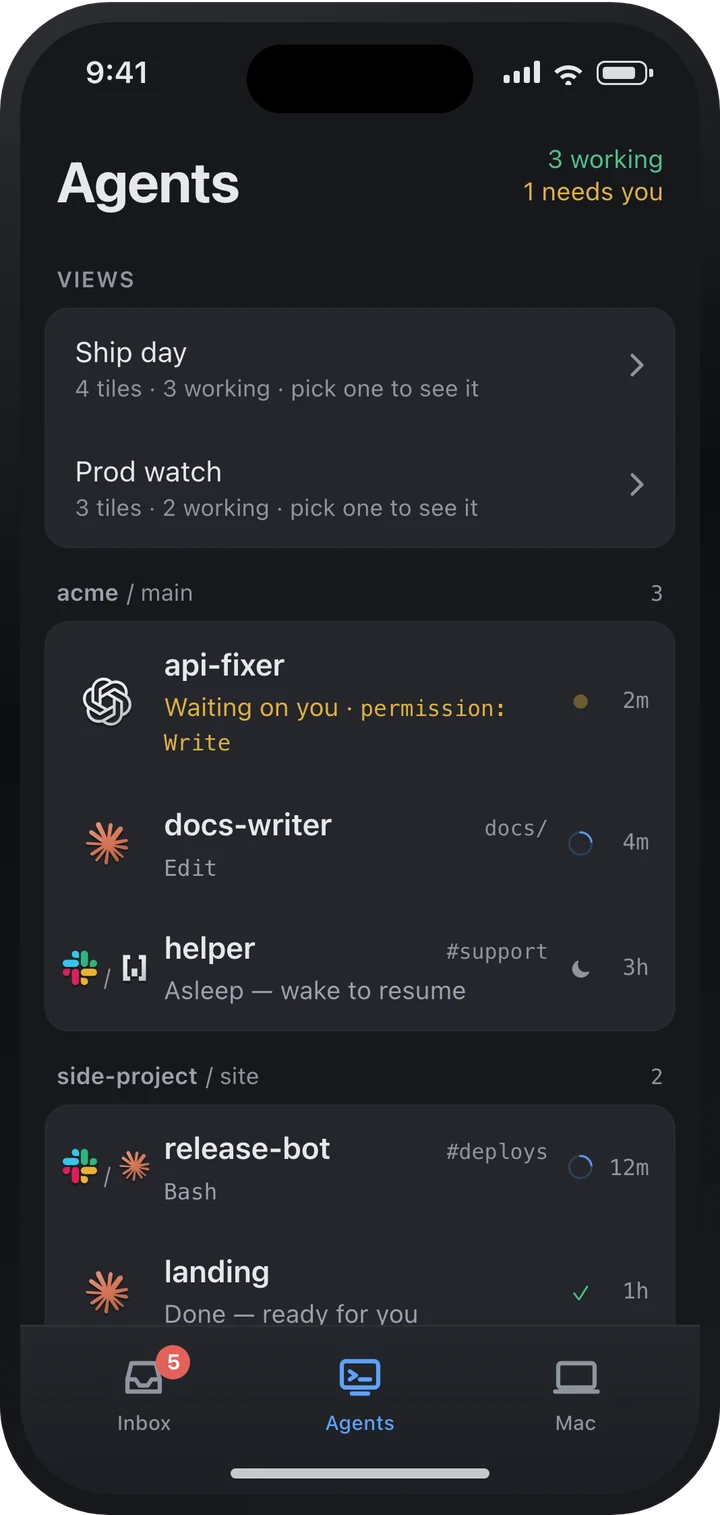
Everything your agents need from you, on your phone: answer Assist, approve a Slack reply, unblock an agent waiting on a prompt or look at its terminal. Free on the App Store.
Every workspace, instruction and automation is plain YAML and markdown in a folder you already own. Put it in git, diff it, grep it. Uninstall AI Bridge tomorrow and your setup is still there, readable without us.
Everything runs on your Mac. Your projects, agents, terminals and files never leave it.
Your agents talk to their own providers, exactly as they would without Bridge, on the subscriptions you already have.
No usage data, no telemetry. On its own, Bridge only checks your licence about once a day once you sign in, and checks for a newer version every few hours, which it downloads only when you say so.
~/Bridge
~/Bridge
acme
project.yamlthe business: its rules
platform
workspace.yamlinstructions, repos, tools
contextread when an agent needs it
rollback-plan.md
automationswhat runs on a schedule
runswhat each run did
product-dev
support
themesyour colours, as CSS
cluster-writes.logevery cluster change, chained
The command center for building and maintaining software.
Your clusters, clouds, databases, Slack and browser, beside the agents working on them. Each through the sign-in and tools already on your Mac, and nothing goes through us.
Kubernetes
Every cluster in your kubeconfig, EKS, AKS and GKE included: pods, logs, Helm, shells and port forwards. A change names its cluster before it runs.
A free extension shares the windows you choose, so your agents can read and work in them, signed in as you, and in nothing else. With Pro, Team or the trial.
Free limits a few things to one each: a cluster, a database server, an AWS account, an Azure subscription, a Google Cloud project, a Slack channel, a custom view and a scheduled automation. Agents in your browser come with Pro, Team and the trial. Pay when you need more.
Monthly prices: Pro $9.99 a month, Team $14.99 a seat a month.
Free
$0for good
For indie developers and side projects. No account, no clock.
A Mac app for running several AI coding agents at once, organised like a team: each one has its place and its own job, so no agent’s context is polluted by another’s work. Each is the real CLI (Claude Code, Codex, Grok or OpenCode) in a real terminal, with a state Bridge knows: working, needs you, done or asleep. It is also your Kubernetes client, your database client (Postgres and MongoDB) and a window on your AWS, Azure and Google Cloud accounts, through your own sign-in, with custom views an AI builds for you, Slack agents, a browser extension that lets your agents work in your own browser, and a free iPhone app.
Does it replace Claude Code or Codex?
No, it runs them. Each agent is the CLI you already use, on your own subscription; AI Bridge is where you start them, keep an eye on them, answer them and pick them up again.
Do I need to be an engineer?
No. Engineers run their coding agents in it, but anyone can connect a company database and ask it questions in plain English: enter its connection details, ask, and read the answer in words and rows. Anything that would change data asks first, and with read-only credentials nothing can change at all. It needs one AI coding CLI on your own subscription, which Settings › Setup can install.
Can an agent answer my Slack for me?
Yes, with you in charge. Connect an agent to a Slack channel: each message becomes a job you approve, the agent works on it on your Mac with the access you gave it, and its reply posts under your name only after you approve it.
Does my code or my conversations go to you?
No. Everything runs on your Mac, and your agents talk to their own providers exactly as they would without Bridge. On its own, Bridge only checks your licence about once a day once you sign in, and checks for a newer version every few hours, which it downloads only when you say so.
Where does it keep things?
In plain YAML and markdown under ~/Bridge, a folder you own. There is no database, and nothing to export.
What does it cost?
Free limits a few things to one each: a cluster, a database server, an AWS account, an Azure subscription, a Google Cloud project, a Slack channel, a custom view and a scheduled automation, and agents in your browser come with Pro, Team and the free trial. Pro is $9.99 a month or $99.99 a year. Team is $14.99 a seat a month or $149.99 a seat a year. For a company that wants no accounts and nothing that phones home, Enterprise is billed per seat, per year: contact us.
What happens if I stop paying?
Your Mac goes back to Free and nothing is deleted. After twelve paid months in a row, you keep the version you have, for good.
What do I need?
A Mac, Apple silicon or Intel (the Intel download), and at least one agent CLI. Settings › Setup can install the rest for you.












 project.yaml
 rollback-plan.md
 cluster-writes.log