Claude Code, Codex and OpenCode in Slack: a coding agent in your channel that works on your Mac

I make AI Bridge. Anthropic, OpenAI and Slack didn't see or pay for this, and every fact about their apps comes from their own docs, linked at the bottom.

Why I wanted the agent on my own Mac
Here’s the situation that got me building this. Someone asks in #support why a customer’s invoice looks wrong. The answer isn’t only in a GitHub repo. It’s in the database, in the logs, in the cluster, sometimes in the branch I’m halfway through.
A cloud bot starts from a fresh copy of the repo. My agent on my Mac already has all of it: the workspace with its instructions and files, the database I connected, my kubeconfig, the tools and MCP servers I set up for that CLI. It can actually find the answer.
And whatever goes out goes out under my name, so I want to read it first. Not every time forever, but at least until the agent has earned it.
How it works in AI Bridge
Connect Slack in about two minutes
Open Settings › Slack and press Connect Slack. AI Bridge opens Slack with your own little app already filled in from a manifest. It’s yours, for your account only. Pick the workspace, press Install to Workspace (some workspaces send that to an admin as a request first), copy the User OAuth Token and paste it back into AI Bridge. It reads only the channels you’re in, never your direct messages, and the token stays on your Mac.
Give a channel an agent
Pick New Slack agent from a workspace’s + menu, or right-click an agent you already have and bind it to a channel like #support or #incidents. Claude Code, Codex and OpenCode agents can all take a channel.
Every message is a job you approve
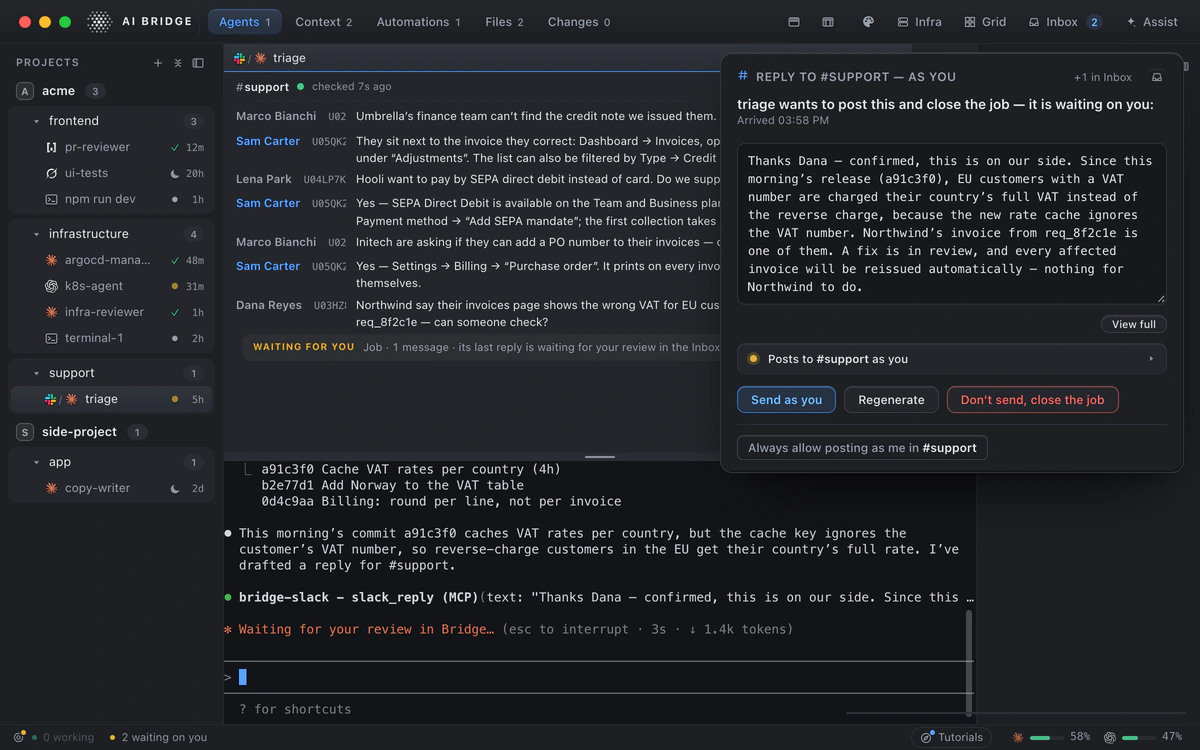
A new message in that channel lands in your Inbox as a job. Approve it and it goes to the agent in its own terminal on your Mac, with the repos, instructions and context of its workspace. Nothing starts on its own. If someone attaches a file, the agent sees it only after you approve that too. Jobs still waiting are there after a restart.
Every reply waits for you
When the agent wants to answer, a card shows you the whole reply and the channel it’s going to. Send as you, edit it first, Regenerate, or Don’t send. What you approve is exactly what posts, and it posts from your own Slack account, so your team gets an answer from you, not from a bot.
Trust a channel once it’s earned it
For a channel where the answers have been right for a while, let the replies post without the card. Pause posting any time. Every post, reviewed or not, goes in a tamper-evident record on your Mac.
AI Bridge, Claude Tag and Codex in Slack, side by side
Slack itself added Slack Code in August, which gives these cloud agents their own code channels. The bots below are the ones you tag in a normal channel.
| AI Bridge | Claude Tag (@Claude) | Codex via @ChatGPT | |
|---|---|---|---|
| Where the agent runs | On your Mac, in the agent’s own terminal | A sandbox in Anthropic’s cloud, one per thread | A Codex Cloud task in a VM |
| Which agents | Claude Code, Codex, OpenCode | Claude | Codex |
| What it can reach | Everything the agent has on your Mac: local repos, workspace instructions, its own tools and MCP servers, connected clusters and databases | GitHub or GitLab repos an admin grants; repo hooks and .mcp.json don’t run | The repo in a published cloud environment |
| Approvals | You approve each job and each reply, until you trust a channel | Auto mode: Claude’s permission checker reviews each action; admins set allow rules | An Allow or Deny card when authorisation is needed |
| Who the reply is from | You, from your own Slack account | Claude’s own account in channels | Not stated in OpenAI’s docs |
| Usual result | An answer in the thread, plus whatever the agent did on your Mac | Usually a draft pull request from the Claude GitHub App | A Codex Cloud task you can follow along with |
| What you need | AI Bridge (one channel free) and your own CLI subscription | Claude Team or Enterprise, set up by an org owner and a Slack admin | A ChatGPT plan with Slack, enabled by an admin |
If you’re on Claude Pro, Max or Ultra, the older Claude Code in Slack still works in workspaces where no organisation has switched on Claude Tag. It runs in Anthropic’s cloud too, against GitHub.
When the cloud bots are the better pick
Being straight about it:
- Nobody’s Mac should have to be on. AI Bridge runs the job on your Mac, so the app needs to be open. The cloud bots don’t care.
- The whole team steers one thread. With Claude Tag anyone in the channel can steer the work, and it bills to the organisation, with no Claude seat needed for Slack users.
- You want a pull request, every time. The cloud bots are built around a PR at the end.
If the answers your team needs live on your machine, in your databases, clusters and half-finished branches, and you want to read what goes out under your name, that’s what AI Bridge is for.
Set it up in five minutes
- Download AI Bridge and open it. Setup installs the agent CLI you want if you don’t have it yet.
- Open Settings › Slack, press Connect Slack and follow the three steps.
- Pick New Slack agent from a workspace’s + menu and choose the channel.
- Ask something in that channel, approve the job in your Inbox, then read the reply and send it.
Questions
Can Claude Code work in Slack?
Yes, two ways. Anthropic’s own Claude Tag (Team and Enterprise) and the older Claude Code in Slack (Pro, Max and Ultra) run the work in Anthropic’s cloud against your GitHub repo. With AI Bridge, your own Claude Code on your Mac takes jobs from a channel and replies as you after you approve.
Can Codex work in Slack?
OpenAI’s ChatGPT app for Slack starts Codex Cloud tasks when you tag @ChatGPT. With AI Bridge, the Codex CLI on your own Mac takes jobs from a channel instead, with the same review before anything is posted.
Does the agent post without me?
Not unless you decide it should. Every job and every reply waits for you by default. Once you trust a channel its replies can post on their own, you can pause that any time, and every post is recorded.
Does it read my direct messages?
No. It reads only channels you’re in, and it only follows the ones you bind to an agent.
Do my colleagues need to install anything?
No. They write in the channel as usual. The reply comes from your own Slack account.
Does my Mac need to be on?
Yes. The agent works on your Mac, so AI Bridge needs to be open to pick up messages. Jobs waiting for you stay in your Inbox, even across a restart.
Is it free?
The Free plan includes one Slack channel, with no account needed. Pro and Team have no limit. The agent itself runs on your own Claude Code, Codex or OpenCode subscription.
Sources
Checked on 17 November 2026. These tools change often; where a source and this page disagree, the source is right, and we would like to hear about it at hello@aibridge.sh.
- Anthropic: introducing Claude Tag · anthropic.com · 23 Jun 2026
- Claude Tag: how it works · claude.com · checked 17 Nov 2026
- Claude Tag for Claude Code users · claude.com · checked 17 Nov 2026
- Claude Tag: setup overview · claude.com · checked 17 Nov 2026
- Claude Tag: GitHub · claude.com · checked 17 Nov 2026
- Claude Code in Slack · code.claude.com · checked 17 Nov 2026
- ChatGPT in Slack (Codex tasks) · learn.chatgpt.com · checked 17 Nov 2026
- Codex cloud environments · learn.chatgpt.com · checked 17 Nov 2026
- Slack: Slack Code · slack.com · 20 Aug 2026
Change log
- : First published.
Keep reading
 How-toClaude Code permissions, explained: modes, sandbox and --dangerously-skip-permissionsHow Claude Code’s six permission modes, allow/ask/deny rules, /sandbox and --dangerously-skip-permissions work in October 2026, with a safe starting policy.
 How-toHow to run several Claude Code sessions at once: worktrees, tmux and appsHow to run several Claude Code sessions at once without collisions: git worktrees, claude --worktree, agent view, tmux, notifications and quota costs.
 ConceptsContext engineering in AI Bridge: one memory for every coding agentHow context engineering works in AI Bridge: Knowledge every coding agent reads, and dreaming, which turns your agents’ repeated mistakes into lessons.
 ComparisonsHerdr vs AI Bridge: a Herdr alternative for when your agents need more than terminalsHerdr is a terminal you shape yourself; AI Bridge has the Inbox, agents in your browser, clusters, databases, Slack and memory built in. Compared.