AI Bridge 1.0: the real AI agents, made easy to run


Why I built it around the terminal
Cursor and the other AI editors build everything around an editor, and that suits a lot of people. It was never how I worked. My day is terminals, and now a handful of coding agents in them, each the real CLI. The agents themselves are great. What wasn’t great was everything around them:
- Losing track. Five agents in five tabs, and no idea which one had been waiting for a yes for the last ten minutes.
- Jumping between apps. Finder or an editor to read the files an agent touched, Lens for the cluster, a database app for the rows, the cloud console for everything else.
- Asking an AI for things I could see myself. Sometimes I just want to know if the pods rolled out. That shouldn’t need a prompt.
I didn’t want to give up the terminal to fix that. I wanted the terminal, with everything around it.
Never used a terminal? You don’t need to
The command-line agents are the most capable AI agents you can run, and the terminal is the only hard part. AI Bridge does that part for you.
- Setup installs them. Settings › Setup checks which agents you have and installs the ones you want, with what they need, each at a click. Then you sign in to the agent with the account you already have.
- The terminal comes ready. Each agent opens in its own tab, ready to go. You type to it the way you’d type to Claude or ChatGPT in their apps, and it works on your actual files.
- You always know what’s happening. Every agent shows whether it’s working, waiting for you or done, and its questions land in one Inbox.
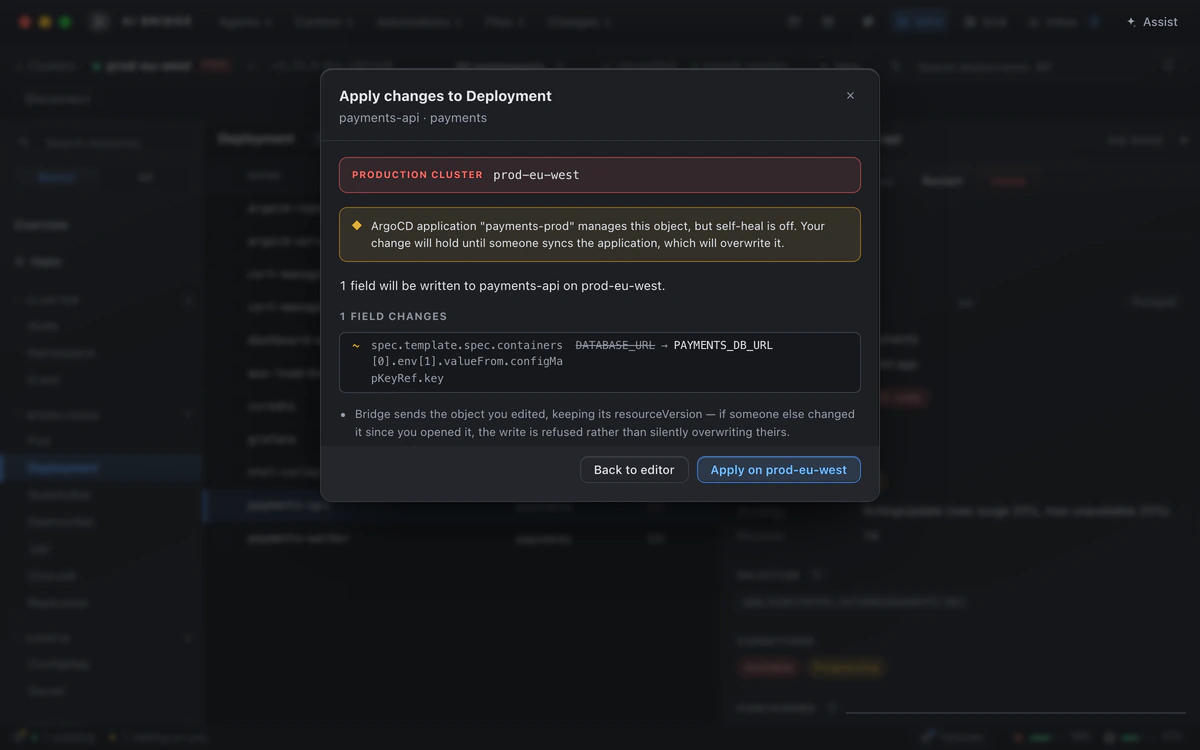
- Anything risky asks first. A change to a cluster or a write to a database waits for your OK, and shows exactly what will happen before it does.
If you’ve been using Claude or ChatGPT in a chat window, this is the next step: the same kind of AI, working on your real projects, with you watching over it.
Your agents, with everything around them
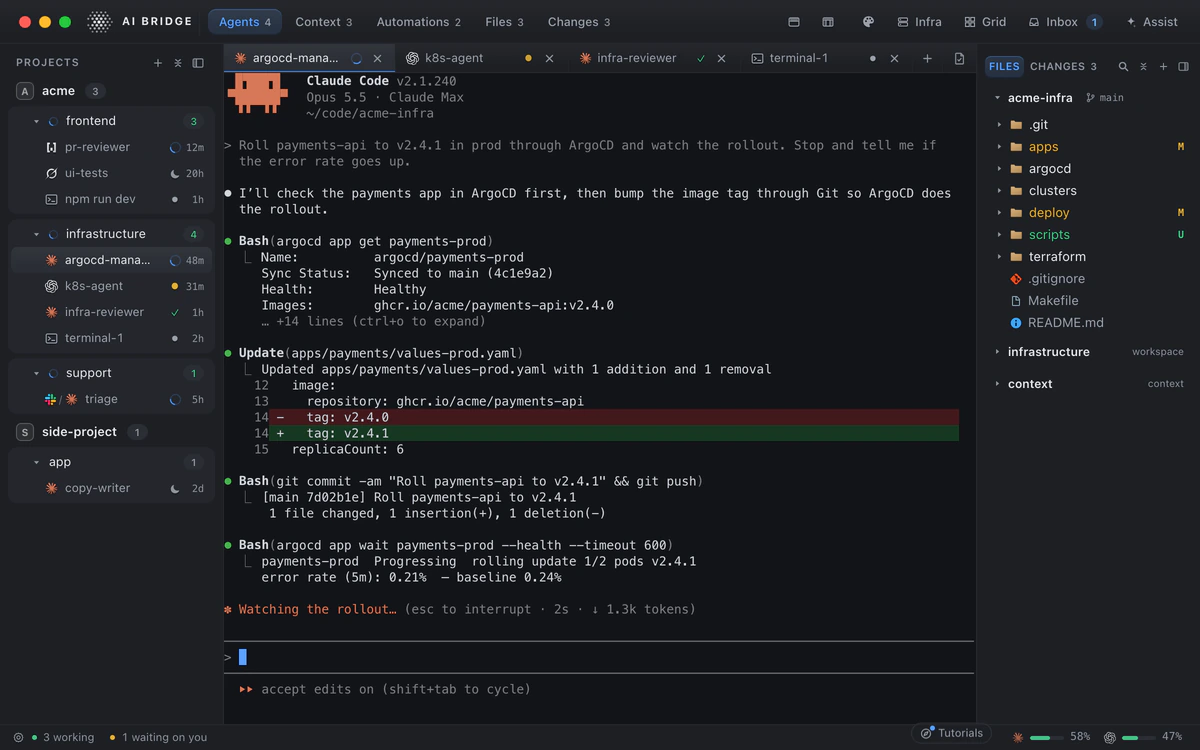
AI Bridge keeps your agents in real terminals and puts what you used to open other apps for next to them. Each agent is the CLI you already pay for, in its own terminal, grouped by the job it’s doing.
- See who needs you. Every agent shows whether it’s working, waiting for you or done. Questions and approvals land in one Inbox. Put the ones that matter today side by side on the Grid, or float them anywhere on the screen.
- Read what changed. The files are a click away, and the Changes tab shows every changed file side by side, so you review an agent’s work without leaving it.
- Pick up tomorrow. Every agent can sleep and wake where it stopped, with its conversation. Turn on keep running in Settings › Startup, and your terminals and Claude Code agents carry on even when AI Bridge is closed or updating.
Ask an agent, or just look
Most AI tools assume you want the agent to do everything. Half the time I just want to look, and in AI Bridge looking is one click.
- Clusters. Every cluster in your kubeconfig, with its pods, logs, events and Helm releases. Check whether the new pods are up, and if something’s stuck, restart it from its menu. The card in front of every change names the cluster, so you never restart production by mistake.
- Databases. Postgres and MongoDB, right beside the agent that’s working on them. Look up a row with a query of your own, or ask in plain English and read the query before it runs. Anything that writes asks you first.
- Clouds. Your AWS accounts, Azure subscriptions and Google Cloud projects, through your own sign-in. Each opens on what needs a look, like a virtual machine that’s stopped but still billed or a volume nothing uses. AKS clusters show the Kubernetes versions they can move to, and AWS and Azure show what they cost.
When it’s a job, hand it to an agent. When it’s a glance, glance. Both happen in the same window, next to the agents doing the work.
A view of anything else
For everything AI Bridge doesn’t show out of the box, you build the view yourself, by asking for it.
Describe what you want to see, say the open pull requests on one repo, the queue depth on a service, or this week’s errors from your logging tool, and an agent builds it. If it needs a key for a service, you give it once: AI Bridge keeps it, runs the reads for the view and keeps pulling, and the view just draws what comes back. The key stays out of the AI’s hands, and any button on the view asks before it runs.
A view sits as a tab next to your agents, in a split or on the Grid, or floats in its own window. Over time it adds up to your own picture of everything you look after, laid out the way you want it.
Agents that stop repeating themselves
Run enough agents and they make the same mistakes. AI Bridge gives every agent the same project knowledge, whichever CLI it runs, and dreaming goes back over their sessions, finds what they keep getting wrong, and turns it into lessons the next agent starts with. You approve each one. I run a dream every now and then, after the agents have had a busy few days.
What 1.0 means
1.0 means AI Bridge is out of beta. It’s stable, and I use it all day myself. The full list of what each version adds is on What’s new.
- It runs on your Mac. Your agents talk to their own providers with your own accounts, and nothing passes through our servers.
- It’s signed and notarised for macOS, and it downloads an update only when you say so.
- The first month is free, with everything, no card needed. After that it’s Pro at $9.99 a month or Team at $14.99 a seat. You already pay for the agents. This is how you run them.
Start in five minutes
- Download AI Bridge, open it and sign in. Your first 31 days are free.
- Setup checks which agent CLIs you have and installs the ones you want.
- Start your agents the way you do now, in a workspace for each job.
- Add a cluster, a database or a cloud account when you want them beside your agents.
Questions
What is new in AI Bridge 1.0?
It’s out of beta. 1.0 also adds agents and terminals that keep running after you quit, a whole project exported to one file and opened on another Mac as you left it, and custom views as tabs beside your agents. What’s new on aibridge.sh lists everything each version adds.
Is AI Bridge an AI editor?
No. It keeps your coding agents as the real CLIs in real terminals and puts your files, changes, clusters, databases and clouds beside them. If you want AI inside an editor, AI editors are built for that.
Do I need to know how to use a terminal?
No. Setup installs the agents for you, each one opens in a terminal that’s ready to use, and you talk to it the way you would in a chat app. Anything risky asks you first. If you already live in the terminal, it’s a real one, with your own shell and prompt.
Which coding agents does it run?
Claude Code, Codex, Grok and OpenCode, side by side, each signed in with your own account.
Do I have to use AI to check my clusters or databases?
No. You can look and act yourself: see whether pods are up and restart them, look up a row, or open a cloud account’s overview. Ask an agent when it’s a job, and just look when it’s a glance.
What does it cost?
The first month is free, with everything and no card needed. After that, Pro is $9.99 a month or $99.99 a year, and Team is $14.99 a seat a month.
Does my code go through your servers?
No. Everything runs on your Mac, your agents talk to their own providers exactly as they would without AI Bridge, and clusters, databases and clouds are reached from your Mac.
Sources
Checked on 24 November 2026. These tools change often; where a source and this page disagree, the source is right, and we would like to hear about it at hello@aibridge.sh.
- AI Bridge 1.0 release notes · github.com · 24 Nov 2026
Change log
- : First published, for AI Bridge 1.0.
Keep reading
 ConceptsContext engineering in AI Bridge: one memory for every coding agentHow context engineering works in AI Bridge: Knowledge every coding agent reads, and dreaming, which turns your agents’ repeated mistakes into lessons.
 ConceptsClaude Code hooks, explained (with examples)Claude Code hooks in October 2026: the 33 events, settings JSON, stdin payload, matchers and exit codes, with notification and command-blocking examples.
 ComparisonsHerdr vs AI Bridge: a Herdr alternative for when your agents need more than terminalsHerdr is a terminal you shape yourself; AI Bridge has the Inbox, agents in your browser, clusters, databases, Slack and memory built in. Compared.
 ComparisonsRex by Superlogical vs AI Bridge: a Rex alternative you can use todayRex by Superlogical is a free terminal multiplexer in beta, with a waitlist. AI Bridge is ready today: Inbox, browser, clusters and memory built in.